Lollipop Font: A Playful Typeface for Handmade Designs
Lollipop Font for Greeting Cards and Handmade Stationery
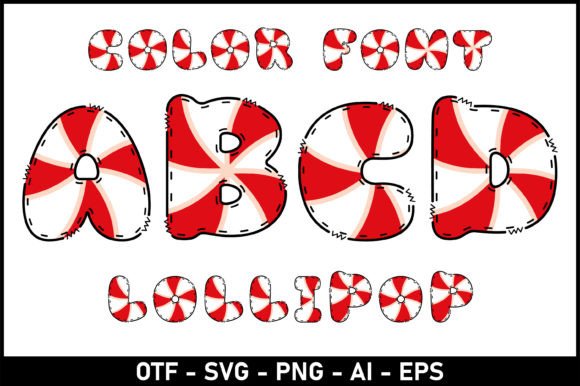
As I sat down to design a set of birthday cards for my Etsy shop, I knew I needed a font that felt personal, cheerful, and just a little whimsical. That’s when I opened up Lollipop Font. This color font immediately caught my eye with its soft curves and friendly letterforms. It’s the kind of font that makes you smile the moment you see it on screen. I used it for the main greeting on each card, and the results were instantly eye-catching. Whether I was creating a thank-you note or a birthday invitation, Lollipop Font gave each design a handmade charm that felt both professional and approachable.
Why Lollipop Font Works for Greeting Cards
Because Lollipop Font is a display font designed for artistic appeal, it shines brightest in short bursts of text—perfect for headlines, names, and special messages. It pairs beautifully with a clean sans serif font for body text, creating a nice visual balance. I found that using it in greeting cards helped elevate the perceived quality of my products, making them feel more premium without overcomplicating the layout.
Lollipop Font for Candle Labels and Product Packaging
When I started making soy candles last fall, one of the biggest challenges was designing labels that felt cohesive with my brand. I wanted something soft and inviting, not too bold or industrial. I tried a few different fonts, but nothing felt quite right until I used Lollipop Font for the scent names and brand tagline. It gave the labels a sweet, boutique-like feel that customers immediately responded to. Because it’s a color font, I had to make sure it was compatible with my label printer, but once I confirmed the file format and tested a few print samples, everything worked smoothly.
Readability Tips for Using Lollipop Font on Small Labels
One thing I learned quickly is that Lollipop Font is best used at a readable size. For candle jar labels, I kept the font above 14pt to ensure clarity. I also avoided using it for long descriptions or ingredient lists. Instead, I reserved it for product names and branding elements. If you’re using it for stickers or packaging, always test a small print sample first—especially if you're using a Cricut or Silhouette cutting machine. The font’s decorative swashes and ligatures can sometimes interfere with clean cuts if scaled too small.
Lollipop Font for Wedding Invitations and Elegant Branding
I recently helped a friend design her wedding invitations, and Lollipop Font became the star of the suite. We used it for the bride and groom’s names and the event date, while a simple serif font handled the rest of the details. The contrast between the elegant script and the playful Lollipop Font gave the invitations a unique personality that felt both modern and timeless. Because it’s a color font, we exported the design as a high-resolution PDF to ensure print quality, and I made sure the font was properly licensed for commercial use before finalizing the files.
Pairing Lollipop Font with Other Typefaces
One of the best things about Lollipop Font is how well it pairs with other fonts. In the wedding invitation suite, we combined it with a classic serif font for a romantic, layered look. When designing boutique tags or digital printables, I often pair it with a minimalist sans serif to keep the layout clean and legible. For seasonal product tags or holiday cards, I’ve even used it alongside a bold script font to create visual interest without clutter.
Lollipop Font for Digital Downloads and Planner Pages
As a printable creator, I’m always looking for fonts that add charm and clarity to digital products. Lollipop Font quickly became a favorite for my planner page designs. I used it for section headers like “Weekly Goals” and “Gratitude Notes,” and it gave the pages a soft, uplifting tone. Since it’s a color font, I made sure to preview each layout in both digital and print formats to ensure the font rendered correctly across devices. It’s also a great choice for quote-based wall art or seasonal printables like Valentine’s Day cards or Easter tags.
What to Check Before Using Lollipop Font Commercially
Before listing any product that uses Lollipop Font—whether it’s a printable, a t-shirt, or a sticker—I always double-check the font’s licensing terms. Most premium fonts like this one come with a commercial license, but it’s important to confirm whether it covers physical goods, digital downloads, or both. I also check for included styles, alternates, and ligatures, which can add flexibility to your designs. File formats like OTF, TTF, and WOFF are essential for compatibility with design software like Canva, Illustrator, or Silhouette Studio.
Lollipop Font for Seasonal Crafts and Holiday Tags
Every holiday season, I create a set of printable tags for gift wrapping, and Lollipop Font has become my go-to choice. It adds a touch of sweetness to Christmas tags, Valentine’s Day cards, and Easter baskets. I especially love using it for names and short phrases like “To: Mom, From: Love” or “Happy Easter.” Paired with a simple border or a hand-drawn illustration, it gives each tag a custom, boutique feel. And because it’s a color font, I can play with different shades to match my seasonal palettes without losing clarity.